
TONE GOD PLAYER / v0.19.1
你的音色,
自己定義。
載入 NAM 音箱模型與 IR,串起你的效果器。
從節奏破音、移調到空間尾音,讓每一段都有自己的聲音。
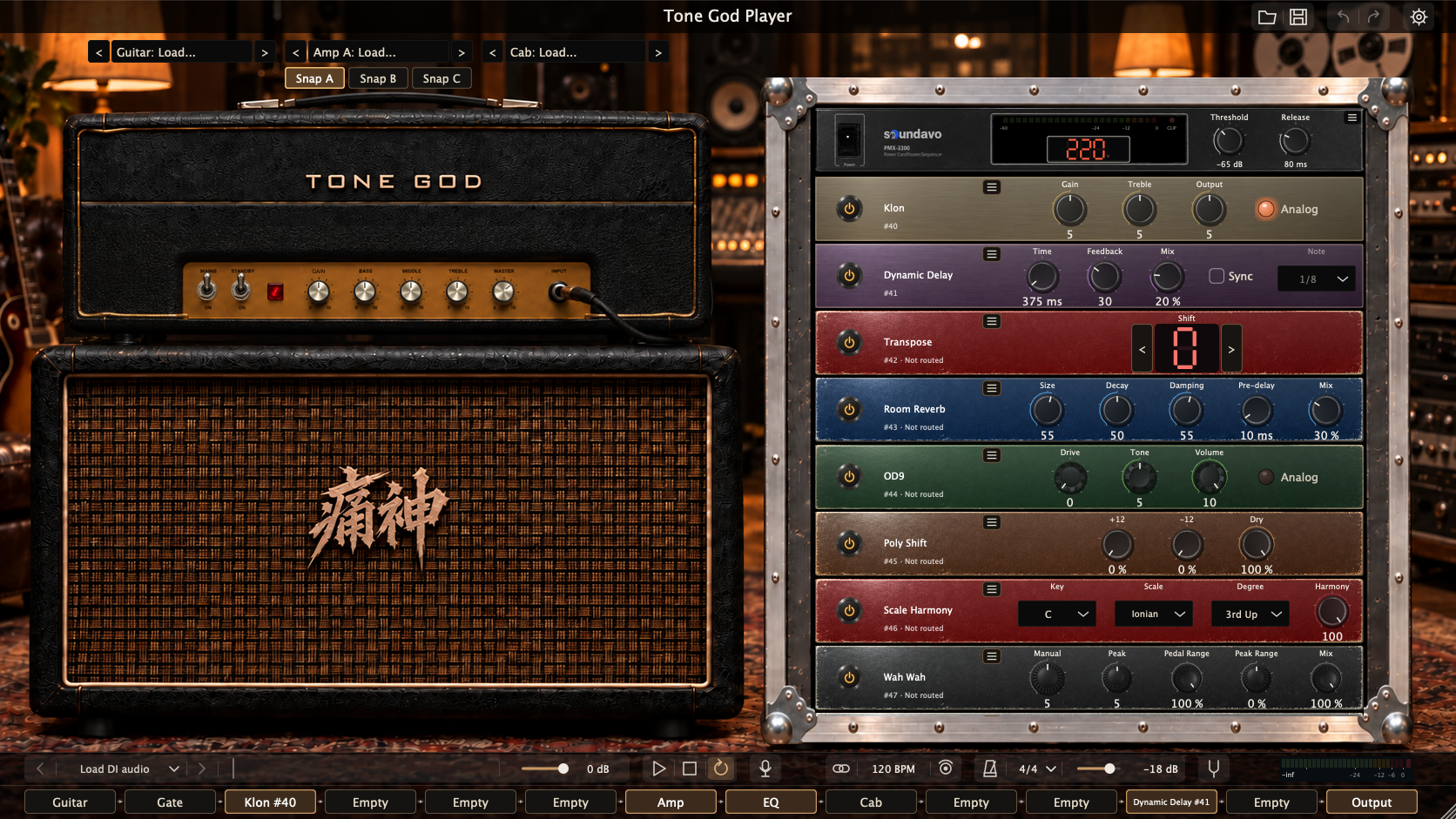
從模型到空間,
每一段都由你決定。
載入你選擇的模型與 IR,安排訊號順序。
音色可以細調,也可以隨演奏切換。
音箱取樣模型
載入音箱模型,透過 Gain 與音箱 EQ 調整聲音。A/B/C 各自保留音箱與效果器設定。
AMP MODELINGIR 箱體與吉他
載入 Guitar IR 與 Cab IR,用 WAV/AIFF 脈衝響應塑造音色,搭配 IR Reverb 延伸空間感。
IMPULSE RESPONSE自由效果器機櫃
35 種效果器涵蓋破音、動態、調變、移調與空間效果。先選聲音,再新增、複製、排序,指派到八個效果路由位置。
MODULAR EFFECTS效果器不只選音色,
也能改變你的彈法。
從推動音箱的 Klon,到踏板控制的 Power Shift。先挑一個演奏目的,再把效果放進你的訊號鏈。
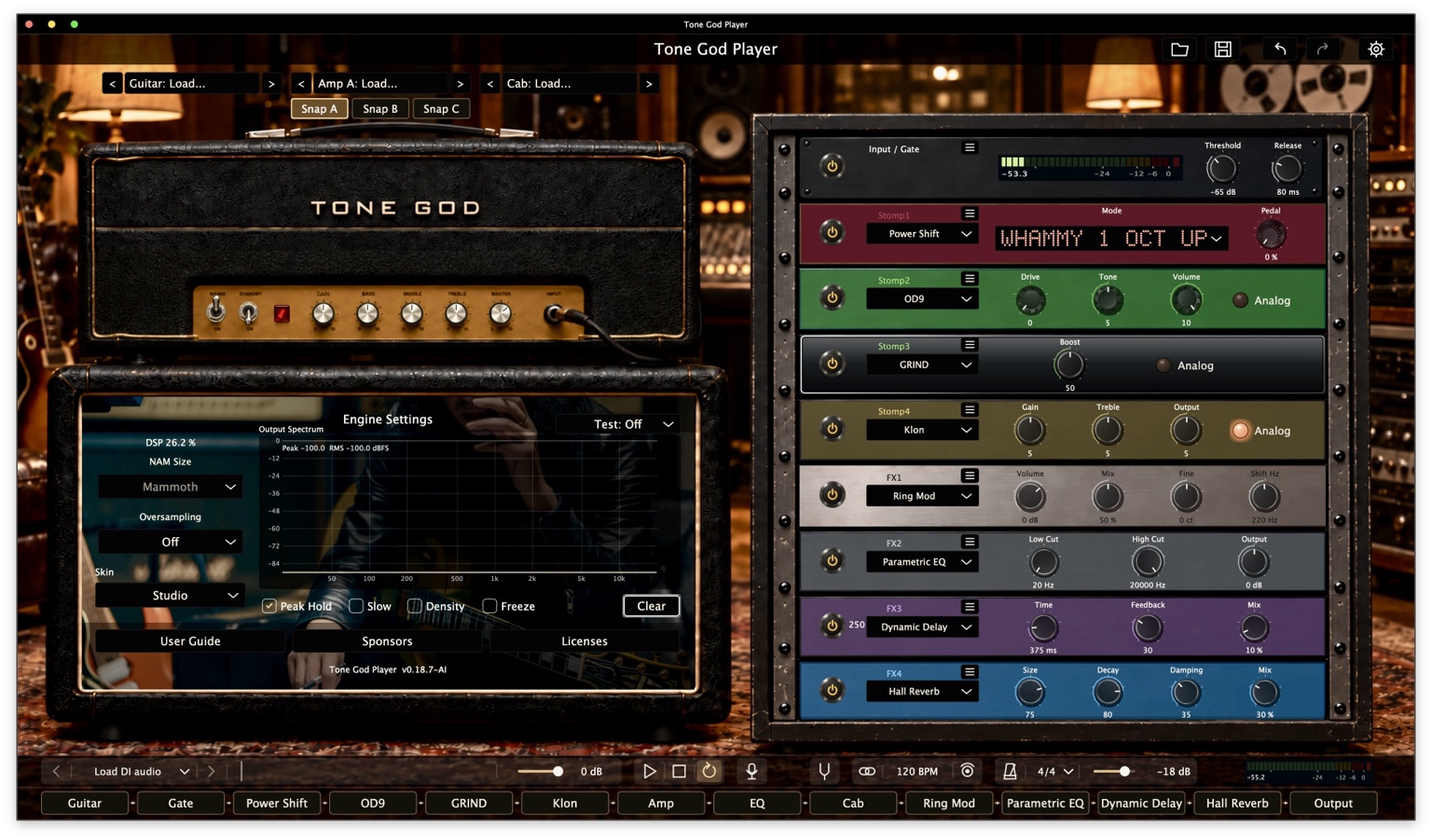
把旋鈕變成演奏的一部分。
這張實際操作畫面可看到 Power Shift、OD9、GRIND、Klon、Ring Mod、Parametric EQ、Dynamic Delay 與 Hall Reverb。效果器參數、踏板控制與訊號位置,一起決定整套音色。
v0.18.7 實際操作截圖,作為效果器介面參考;目前版本的機櫃排列與外觀可能不同。查看完整操作畫面Klon
從輕推到破音,留下調整的空間。以 Gain 決定推動程度,Treble 修整亮度,Output 配合音箱輸入。
Power Shift
以踏板位置控制彎音,搭配和聲與 Detune 模式。21 種模式,讓移調成為演奏的一部分。
Scale Harmony
依主調、音階與音程加入和聲聲部。使用單音音高追蹤,適合從清楚的單音旋律開始探索。
Dynamic Delay
延遲音量跟隨輸入動態變化。彈奏時讓重複音退後,留白時再讓尾音浮現。
Analog Delay
類比風格的延遲,讓重複音帶著濾波後的色彩。以 Time、Feedback 與 Mix 安排節奏與層次。
Pedal NAM
將相容的單聲道 NAM 踏板模型加入機櫃,安排在音箱前後,並以 Mix 與 Volume 調整混合與音量。
功能介紹依 v0.19.1 的效果器內容整理。Klon、OD9 與 GRIND 的 Analog 開關是電路噪音選項;實際聲音與音高追蹤反應會受輸入、模型及設定影響。
查看完整 35 種效果器
破音與推動音箱 (8)
- OD9
- 調整破音、Tone 與輸出
- Klon
- Gain、Treble 與輸出調整
- GRIND
- Boost 與前級音色塑形
- Germanium Fuzz
- 鍺風格 Fuzz
- Silicon Fuzz
- 矽風格 Fuzz
- Tube Distortion
- 真空管風格破音
- Hard Clip
- 硬削波破音
- Metal Distortion
- 高增益破音
移調與合成 (5)
- Power Shift
- 踏板彎音、和聲與 Detune
- Transpose
- 半音移調
- Poly Shift
- 高低八度與原音混合
- Scale Harmony
- 依調性與音階加入和聲
- Guitar Synth
- 吉他合成音色
調變與 Wah (7)
- Chorus
- 合唱調變
- Phaser
- 相位調變
- Flanger
- 梳狀濾波調變
- Tremolo
- 音量週期變化
- Rotary/Leslie
- 旋轉喇叭效果
- Wah Wah
- Wah 濾波掃頻
- Ring Mod
- 環形調變
動態與音色塑形 (6)
- Opto Comp
- 光學風格壓縮
- VCA Comp
- VCA 風格壓縮
- FET Comp
- FET 風格壓縮
- Parametric EQ
- 參數式等化
- Match EQ
- 頻率曲線比對
- Bitcrush
- 位元與取樣率質感
延遲與空間 (8)
- Digital Delay
- 數位延遲
- Analog Delay
- 類比風格延遲
- Dynamic Delay
- 依演奏動態調整延遲音量
- Spring Reverb
- 彈簧殘響
- Plate Reverb
- 板式殘響
- Room Reverb
- 房間空間感
- Hall Reverb
- 大廳空間感
- IR Reverb
- 載入殘響脈衝響應
自己的效果器模型 (1)
- Pedal NAM
- 載入相容的單聲道 NAM 踏板模型
讓設定跟上演奏。
三組音色,同一套機櫃。
A/B/C 共用機櫃與路由,各自保存參數、開關與模型資產,讓不同段落的設定集中在同一個工作流程。
把控制交給你的踏板
MIDI Learn 對應旋鈕與開關,支援範圍調整與反向映射。PC Learn 可把 MIDI Program Change 指派到 A/B/C 快照;效果器移動後,控制映射仍跟著它走。
練習、試音、反覆比較
載入音檔、循環播放,使用調音器、Tap Tempo 與節拍器。插件也能跟隨有效的宿主 BPM。
把整套音色一起保存
儲存預設,或以 .tgpack 封裝音色與相關模型、IR 資產,方便在之後繼續編輯。
從一條吉他導線開始。
啟動時保持空白。選擇自己的模型,建立自己的音色。
- 01
設定輸入與輸出
在獨立版 Audio Settings 選擇聲卡與吉他輸入;AU/VST3 由宿主管理音訊。
- 02
載入音箱模型與 Cab IR
從 Amp、Cab 載入區選擇檔案,再用 Gain、EQ 與 Output 調整。
- 03
加入效果並保存
在機櫃右鍵新增效果器,指派路由,建立 A/B/C 音色快照並儲存預設。
痛神,
從音色開始。
吉他音色製作 · 音箱取樣
痛神(TONE GOD)由 Mori(morimagic)打造,從吉他音色製作與音箱取樣起步。音色包是品牌的主軸,實際演奏與錄音的經驗,則是調整聲音的出發點。
從製作音色出發,痛神也延伸開發 TONE GOD Player 與 MIDI Bridge,讓音色的使用與控制更貼近吉他手的工作流程。Player 承接這份音色製作的經驗;MIDI Bridge 仍在開發中,尚未公開發布。
支持 TONE GOD Player 開發
台灣贊助 NT$990
匯款後填寫贊助表單,再由 Mori 將你加入 LINE 群。
- 查看表單中的匯款資訊並完成匯款。
- 匯款後填寫表單;填寫時需登入 Google 帳號。
- 由 Mori 將你加入 LINE 群。
表單需登入 Google;匯款資訊以表單內容為準。
音色持續進化。
目前版本為 v0.19.1-AI。macOS 與 Windows x64 已完成建置。
台灣贊助方式與後續流程,請見上方贊助表單。
目前支援哪些使用方式?
macOS 包含獨立應用程式、AU 與 VST3;Windows x64 包含獨立應用程式與 VST3,20 項自動化測試全部通過。Windows 實體音效介面、ASIO 與 DAW 操作仍待驗證。
需要準備哪些檔案?
請準備相容的音箱模型檔;IR 可載入 WAV/AIFF。程式啟動時不會自動載入模型或音檔,請自行選取需要的素材。
這個網站可以直接處理吉他音訊嗎?
這裡是 TONE GOD Player 的產品介紹。實際演奏與音訊處理需在 Player 應用程式或插件內進行。
TONE GOD PLAYER / v0.19.1
Your tone.
Your rules.
Load NAM amp models and IRs, then build your effects chain.
From rhythm drive and pitch shifts to ambient tails, give every part its own sound.
From amp models to ambience,
shape every stage.
Load your models and IRs. Arrange your signal chain.
Fine-tune your sound and switch it as you play.
Sampled amp models
Load amp models and shape them with Gain and amp EQ. A/B/C snapshots each retain their own amp and effect settings.
AMP MODELINGCabinet and guitar IRs
Shape your sound with Guitar IR and Cab IR in WAV or AIFF format. Add IR Reverb to explore acoustic spaces.
IMPULSE RESPONSEA flexible effects rack
35 effects cover drive, dynamics, modulation, pitch shifting and reverb. Add, duplicate and reorder them, then assign them to eight effects routing positions.
MODULAR EFFECTSChoose a sound.
Find a new way to play.
From pushing an amp with Klon to pedal-controlled Power Shift. Start with a playing idea, then build the chain around it.
Put the controls into your performance.
This app screenshot shows Power Shift, OD9, GRIND, Klon, Ring Mod, Parametric EQ, Dynamic Delay and Hall Reverb. Effect settings, pedal control and signal position all shape the rig.
Actual v0.18.7 app screenshot, shown as an effects-interface reference. Rack layout and appearance may differ in the current version.View the full app screenshotKlon
Shape drive with Gain, adjust brightness with Treble, and set Output to suit the amp input.
Power Shift
Control pitch bends with pedal position, alongside harmony and detune modes. Choose from 21 modes to make pitch part of the performance.
Scale Harmony
Add a harmony voice with a selected key, scale and interval. Monophonic pitch tracking makes a clear single-note melody the place to start.
Dynamic Delay
Repeat level responds to input dynamics, pulling back while you play and coming forward in the spaces between phrases.
Analog Delay
Analog-style delay gives filtered repeats their own color. Set Time, Feedback and Mix to shape the rhythm and depth.
Pedal NAM
Load a compatible mono NAM pedal model into the rack, place it before or after the amp, and adjust Mix and Volume.
Effect descriptions reflect v0.19.1. The Analog switches on Klon, OD9 and GRIND are circuit-noise options. Sound and pitch-tracking behavior depend on the input, models and settings.
Explore all 35 effects
Drive & boost (8)
- OD9
- Drive, tone and output shaping
- Klon
- Gain, treble and output control
- GRIND
- Boost and preamp tone shaping
- Germanium Fuzz
- Germanium-style fuzz
- Silicon Fuzz
- Silicon-style fuzz
- Tube Distortion
- Tube-style distortion
- Hard Clip
- Hard-clipping distortion
- Metal Distortion
- High-gain distortion
Pitch & synth (5)
- Power Shift
- Pedal bends, harmony and detune
- Transpose
- Semitone transposition
- Poly Shift
- Upper/lower octaves and dry blend
- Scale Harmony
- Key- and scale-based harmony
- Guitar Synth
- Guitar synth tones
Modulation & wah (7)
- Chorus
- Chorus modulation
- Phaser
- Phase modulation
- Flanger
- Flanging
- Tremolo
- Rhythmic volume modulation
- Rotary/Leslie
- Rotary speaker effect
- Wah Wah
- Wah filter sweeps
- Ring Mod
- Ring modulation
Dynamics & shaping (6)
- Opto Comp
- Optical-style compression
- VCA Comp
- VCA-style compression
- FET Comp
- FET-style compression
- Parametric EQ
- Parametric equalization
- Match EQ
- Frequency-curve matching
- Bitcrush
- Bit-depth and sample-rate textures
Delay & space (8)
- Digital Delay
- Digital repeats
- Analog Delay
- Analog-style repeats
- Dynamic Delay
- Repeats that respond to playing dynamics
- Spring Reverb
- Spring-style reverb
- Plate Reverb
- Plate-style reverb
- Room Reverb
- Room ambience
- Hall Reverb
- Hall ambience
- IR Reverb
- Convolution reverb from IR files
Your pedal models (1)
- Pedal NAM
- Load compatible mono NAM pedal models
Keep your rig in step with your playing.
Three tones. One rack.
A/B/C share a rack and routing, with separate parameters, switches and model assets. Keep settings for different parts of a song in one workflow.
Put control at your feet
Map knobs and switches with MIDI Learn, including adjustable ranges and reverse mappings. Use PC Learn to assign MIDI Program Change messages to A/B/C snapshots. Controller mappings stay with effects when you move them.
Practice. Audition. Compare.
Load and loop audio files, and use the tuner, Tap Tempo and metronome. The plugin can also follow a valid host BPM.
Save the whole rig
Save a preset or bundle your tone with its model and IR assets in a .tgpack, ready to edit again later.
Start with a guitar cable.
Start with an empty rig. Choose your models and build your sound.
- 01
Set up your audio
Select your interface and guitar input in the standalone Audio Settings. AU and VST3 audio is managed by your host.
- 02
Load amp models and Cab IR
Choose files in the Amp and Cab load areas, then adjust Gain, EQ and Output.
- 03
Add effects and save
Right-click the rack to add effects, assign routing, create A/B/C snapshots and save your preset.
TONE GOD
began with tone.
GUITAR TONES · AMP SAMPLING
TONE GOD, known as 痛神 in Chinese, was created by Mori (morimagic). It began with guitar tone creation and amp sampling. Tone packs remain at the heart of the brand, shaped by hands-on playing and recording experience.
That work has grown into tools such as TONE GOD Player and MIDI Bridge, bringing tone use and control closer to a guitarist’s workflow. Player carries that tone-making experience forward. MIDI Bridge is still in development and has not been publicly released.
Support TONE GOD Player development
USD 30 minimum · Pay what you want
Support development and get access to the v0.19.1-AI beta for macOS and Windows through Gumroad.
Support on GumroadUSD 30 minimum; pay more if you wish. See the product page for package details and system requirements.
The sound keeps evolving.
Current version: v0.19.1-AI. macOS and Windows x64 builds are complete.
Get beta access through the Gumroad support link above.
How can I use Player?
macOS includes standalone, AU and VST3. Windows x64 includes standalone and VST3, with all 20 automated tests passing. Physical audio interface, ASIO and DAW operation on Windows remain unverified.
Which files do I need?
Bring compatible amp model files; IRs support WAV and AIFF. Player starts without loading models or audio files automatically, so you can choose your own assets.
Can this website process guitar audio?
This is the TONE GOD Player product website. Use the Player app or plugin for live playing and audio processing.
Contact TONE GOD
Need help using Player, or want development and release updates? Contact us through our official social channels.
© 2026 TONE GOD · MORIMAGIC

沒有留言:
張貼留言